 Trackig
Every step. Every mile.
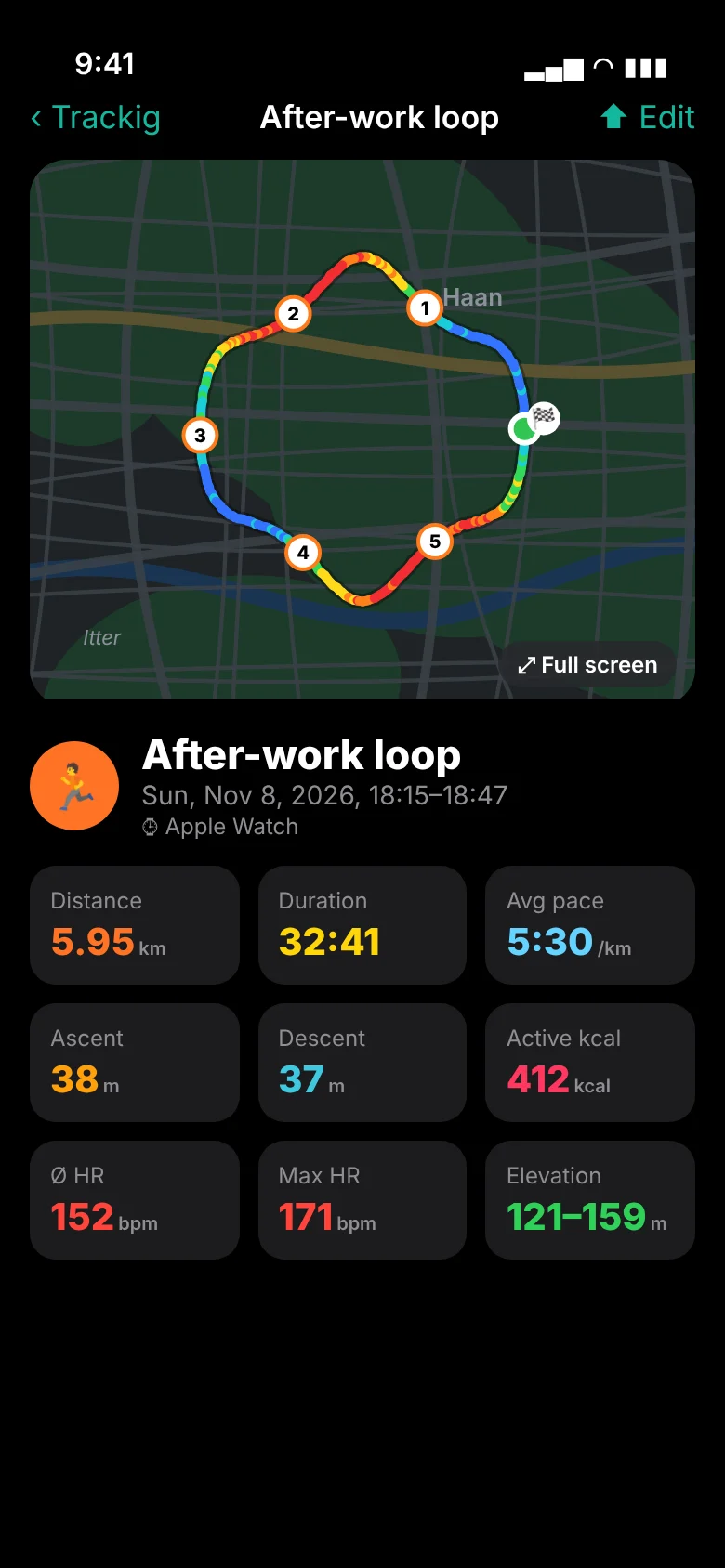
Start a workout on your Apple Watch, watch your route grow on a live map and get your split time at every kilometer or mile. Afterwards everything is on your iPhone: map, elevation profile, pace, heart rate and splits – with GPX import and export, connected to Apple Health.
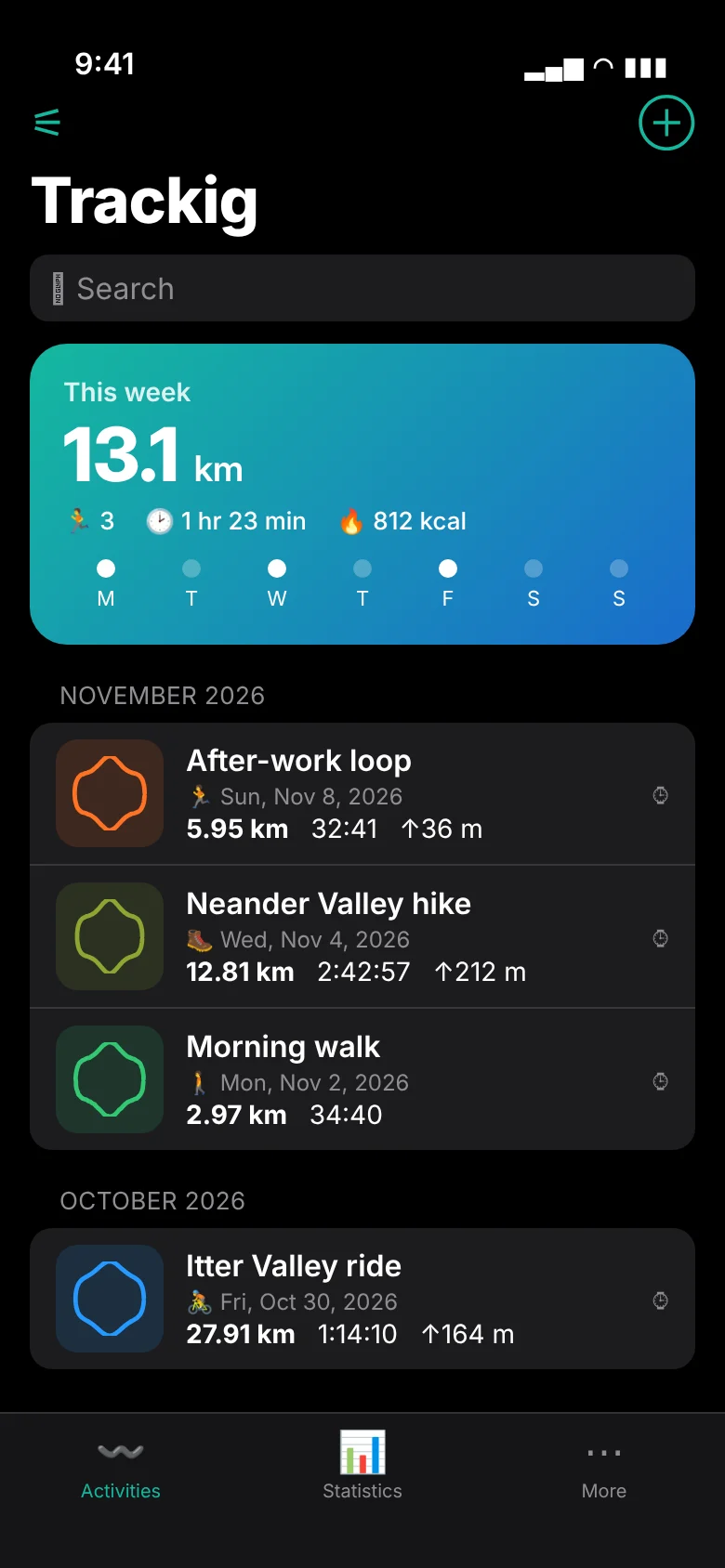
Walking, running, hiking, cycling or climbing – one tap, 3-2-1, go.
Your route grows on the watch, and the map turns with your direction. Zoom with the Digital Crown, pan and rotate with your finger.
Map, duration, distance, pace, heart rate with zones, elevation, calories and splits.
At every full kilometer or mile: split time, heart rate and vibration. Voice feedback every ¼, ½, 1, 2 or 5 miles – or 250 m to 5 km.
The app speaks English and German – with miles or kilometers, just as you like.
Your route colored by speed, elevation or heart rate – plus elevation profile, pace chart and splits.
Open tracks from Files, Mail or AirDrop and share any activity as GPX.
An imported track appears as a dashed line on the watch during your workout – to help you find your way.
Workouts are saved to Health with their route and count towards your Activity rings. Health workouts can be imported.
Week, month and year at a glance – with totals per sport and personal bests.
The watch records on its own and transfers the workout as soon as your iPhone is nearby again.
From your first lap to a half marathon, Everest-sized climbing and a 30-day streak – in bronze, silver, gold and platinum.
Stop moving and the watch pauses the timer – and resumes as soon as you go again. Can be turned off.
Your week with a ring towards your weekly goal and your latest track, right on the Home and Lock Screen.
When importing GPX you decide: done it yourself or just planned – planned routes don't count in your statistics.
Import all matching workouts from Apple Health with one tap – including route and heart rate.
Every 500 × 500 m square you cross becomes yours. The watch announces new tiles while you're out.
Tap to enlarge. Sample data.
Every Needful ThingX app costs a one-time €2.99 (or the equivalent in your country). After that it's yours – no subscription, no ads, and nobody looking over your shoulder.
Buy once and use it for good.
No monthly fees, no cancellation periods.
No banners, no pop-ups, no sponsored content.
No analytics, no advertising IDs, no sharing.
No sign-up, no email address, no password.
Every feature is included from day one.
New features cost nothing extra.
One purchase covers the whole family.
On your iPhone and Apple Watch and in Apple Health – no server of our own.
Workouts, tracks and measurements stay on your iPhone and Apple Watch.
GPS is only used while you record a workout on the watch.
Trackig only reads and writes what you allow in Health – nothing is shared.
No account, no ads, no analytics, no sharing with third parties.
All details are in the privacy policy (in German).
Trackig costs a one-time €2.99 (or the equivalent in your country). There is no subscription, no in-app purchases and no ads – all features and all future updates are included.
Trackig is almost finished and coming soon to the App Store. Send me a short email and I'll let you know when it launches.
Yes. The app is available in English and German and follows your iPhone's language by default. You can also pick the language and units – miles, feet and mph or kilometers, meters and km/h – in the app under “More”.
Yes. With Apple's Family Sharing one purchase is enough: up to five other family members can download Trackig without buying it again.
iPhone with iOS 17 or later and Apple Watch with watchOS 10 or later. The watch app is installed together with the iPhone app.
No. No account, no analytics and no ads. Your workouts stay on your iPhone, Apple Watch and – if you allow it – in Apple Health. Needful ThingX doesn't run a server for this.
To record workouts, yes – the workout runs on the watch. With the iPhone alone you can view, analyze and export GPX files and workouts from Apple Health.
No. The watch records route, heart rate and elevation on its own and transfers the workout as soon as your iPhone is reachable again. For the map background the watch needs a connection (iPhone, Wi-Fi or cellular); your route is recorded without one, too.
Yes. The watch saves every workout with its route to Apple Health – just like Apple's Workout app.
Yes. “This week” shows your distance with a ring towards your weekly goal, daily bars and optionally your latest activity – in three sizes and on the Lock Screen. “Latest activity” shows the shape of your latest track. Set the weekly goal in the app under “More”.
Yes. After every GPX import Trackig asks whether you did the route yourself or whether it's a planned route. Planned routes are kept as a track only, don't count towards statistics, badges and tiles – and can be sent to the Apple Watch as a route.
Trackig divides the map into squares of about 500 × 500 m (0.3 × 0.3 mi). Every square one of your workouts passes through counts as conquered and is colored on the tile map. It's a great reason to explore new paths: how big will your complete square get? The Apple Watch announces new tiles while you're out. Everything is calculated on your devices only.
Tracks and routes from common apps and portals such as Komoot, Strava, Garmin or AllTrails. Heart rate in the Garmin extension is imported too. When exporting, Trackig writes standard GPX 1.1 files.
Trackig will be available soon for a one-time €2.99. Want to know when it launches? Just send a short email – I'll get back to you on launch day.
✉︎ Notify me at launch Zählpuls
 Spritzig
 Moneta
 Belegfix
 Listig
 Fairteilt
 Kartig
 Griffig
 Kräftig